
wiki:multitech-conduit-lns-config
This is an old revision of the document!
Table of Contents
Configuring SiteSync module for Multitech Onboard LNS
You will need:
- Username and Password that authenticates in Multitech Conduit
- URL of Multitech Conduit
- Open firewall ports from Ignition to Conduit
- Default app to forward data from Conduit to MQTT Broker
- URL and needed credentials to MQTT Broker
MQTT Settings:
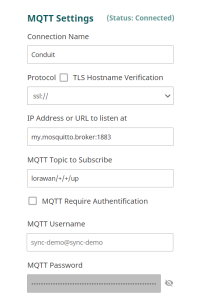
Connection Name: friendly name of the broker connection
Protocol: SSL or TCP, protocol connection of the broker
IP Address or URL to Listen At: location of broker
MQTT Topic to Subscribe: default topic is: lorawan/+/+/up
Join Server:
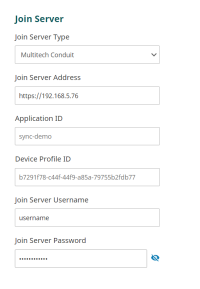
Join Server Type: Multitech Conduit
Join Server Address: IP address of conduit, includes https
Join Server Username: Username that can authenticate with conduit
Join Server Password: Password that can authenticate with conduit
wiki/multitech-conduit-lns-config.1692032652.txt.gz · Last modified: 2023/08/14 17:04 by mbrauer