
wiki:ttn
This is an old revision of the document!
Table of Contents
Things Needed:
- SiteSync module and project installed
- URL of Things Industries server
- AppID of Things app to add devices into
- API Token registered with app
- MQTT username and password registered with app
MQTT Connection
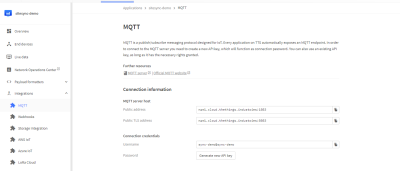
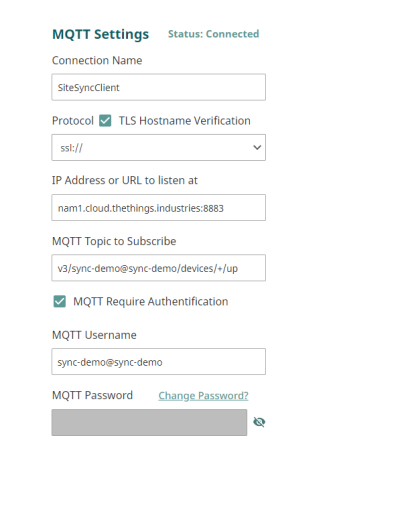
- Connection Name: a friendly name for this connection
- Protocol: SSL or TCP, depending on your MQTT Broker connection
- IP Address or URL to Listen at: Can be found in the MQTT integration portion of the app
- MQTT Topic: the topic is strictly v3/{MQTT username}/devices/+/up
- MQTT Username: Can be found in the MQTT integration portion of the app
- MQTT Password: Generated in the MQTT integration portion of the app.
Join Server
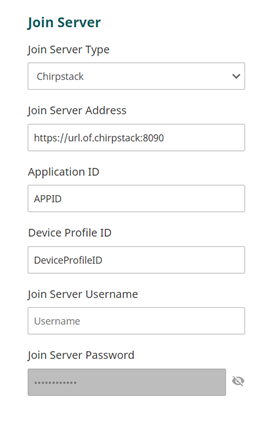
- Join Server: Select Chirpstack
- Join Server Address: your Chirpstack Server and port, default is 8090. Include http or https.
- Application ID: your Chripstack App ID.
- Device Profile ID: your device profile ID.
Join Server username and Password are blocked from edits, are not being used for Chripstack but are used with other kinds of network servers
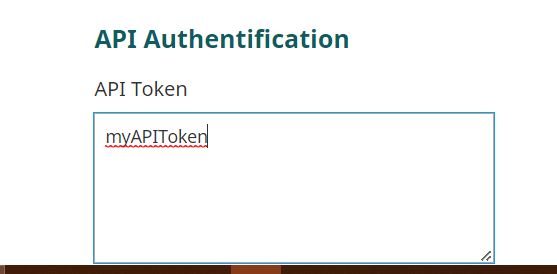 Enter API token
Hit submit.
Enter API token
Hit submit.
The Module will try to connect to your broker, and the status label will update with the connection attempts results. Full logs can be found under Data/Diagnostics, searching the term BROKER to see logs related to connecting.
wiki/ttn.1713197290.txt.gz · Last modified: 2024/04/15 16:08 by mbrauer