
Site map
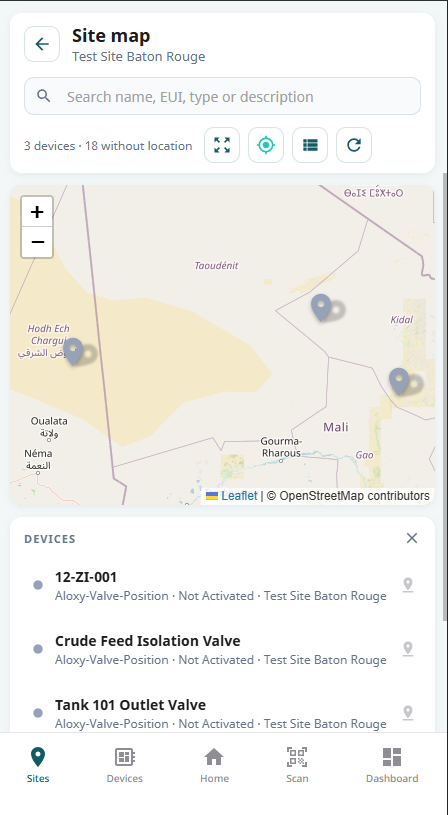
Each site has a map showing every device that has a location, as a status-colored pin. It’s the quickest way to see where your devices are and how they’re doing at a glance.
Open the map
Section titled “Open the map”Open the site map from the site card — in the Enterprise Management app and in the Field App, the card has a Site map button that takes you to that site’s map.
On the map
Section titled “On the map”- Pins — one per located device, colored by the device’s status, so problems stand out.
- Search bar — filter the devices shown by name.
- Device count — how many devices are on the map, plus how many are without location (those can’t be shown — see below).
- Controls — fit all (zoom to show every pin), my location (center on where you are), list (open the device list), and refresh.
- Device list — a collapsible side list of the site’s devices. Selecting a row flies the map to that device and opens its card.
- Your location — your own position is shown on the map when your browser shares it.
Device card
Section titled “Device card”Selecting a pin (or a list row) opens a card for that device with its photo, device type, status, site, location description, and last-seen time, plus a link to open the full device page.
Which devices appear
Section titled “Which devices appear”A device shows on the map only when it has an install latitude and longitude set in its metadata. A device with no coordinates — or coordinates of exactly 0, 0 — counts as having no location and is reported in the “N without location” count instead of appearing as a pin. Set a device’s install location on the device page to place it on the map.
The card uses the device’s location description and photo metadata when they’re present.